
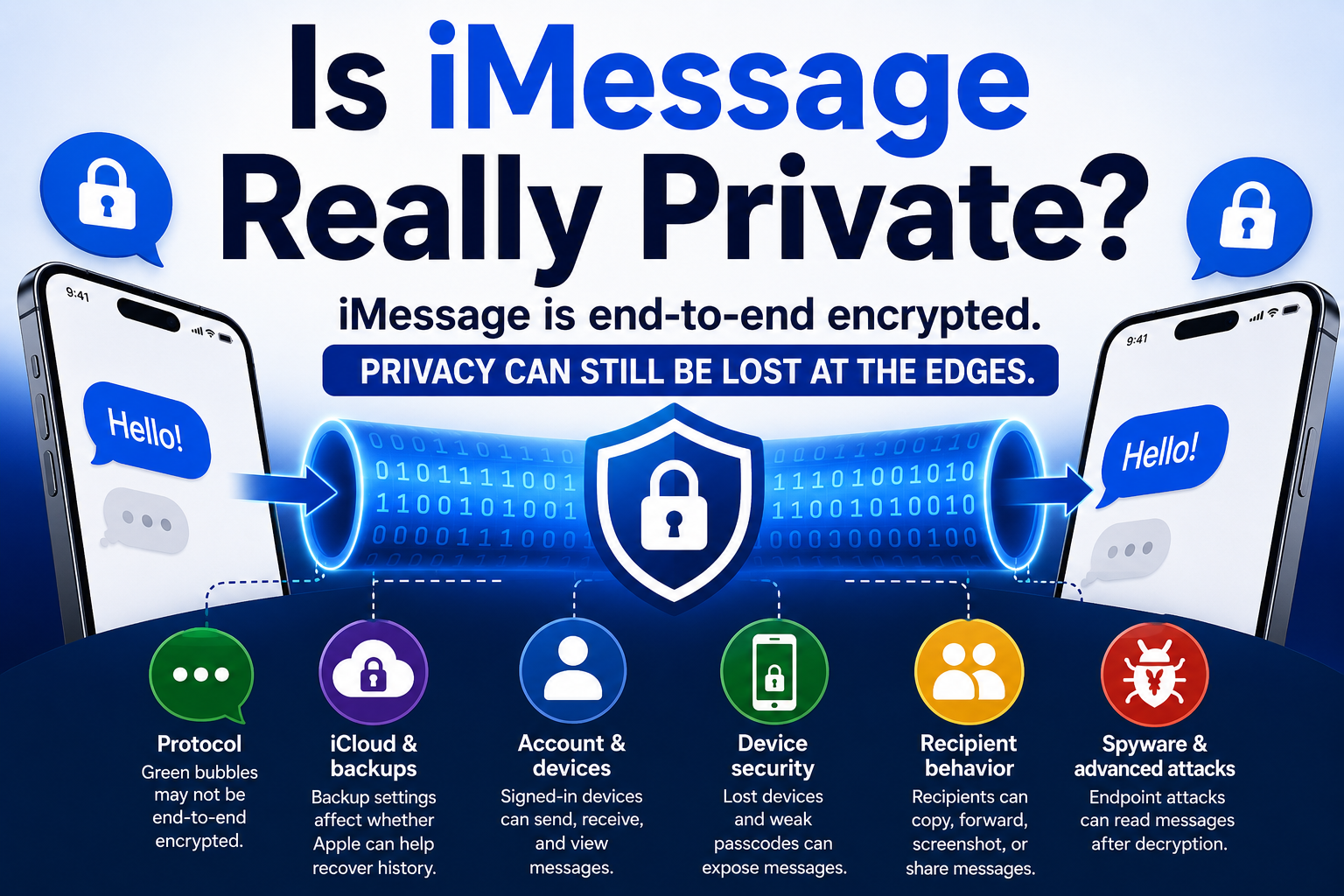
Is iMessage Really Private?
iMessage provides strong protection for messages while they travel between supported Apple devices. But the word private describes more than what happens during transmission.
That is the central distinction behind the infographic.
A blue bubble means the message used Apple’s iMessage service and received end-to-end encryption in transit. Apple states that it cannot read or intercept the message content while it moves between participating devices.
That is a substantial privacy protection.
It is not a guarantee that every copy of the conversation is inaccessible to everyone except the sender and recipient.
End-to-end encryption protects the tunnel
End-to-end encryption means the message is encrypted before leaving the sender’s device and decrypted by the recipient’s device.
For iMessage, this protection applies to text, photos, videos, audio messages, documents, and other attachments.
It helps prevent network operators, Wi-Fi providers, carriers, internet observers, and Apple itself from reading the live content as it passes through the service.
This is the tunnel shown in the infographic.
But encryption protects the route between endpoints. It does not automatically protect everything that happens before the message enters the tunnel or after it leaves.
That is why a conversation can remain strongly encrypted in transit while still being exposed through a device, account, cloud backup, notification, or recipient.
The Messages app does not always use iMessage
One of the most important practical questions is which protocol actually carried the conversation.
A blue bubble generally indicates iMessage and its end-to-end encryption.
Green messages may use SMS, MMS, or RCS. SMS and MMS are not end-to-end encrypted. RCS protection depends on software, carrier support, rollout status, and whether the conversation displays Apple’s lock icon and Encrypted label.
This means the Messages app itself does not determine the level of protection.
The protocol does.
A conversation may also change protocols when participants are added, a device loses service, or someone in a group is not using iMessage. That is why the visible color and encryption indicator matter.
The relevant question is not simply:
Was the message sent through Apple’s Messages app?
It is:
Which messaging system actually delivered it?
Cloud recovery is separate from live transmission
The privacy of a message in transit and the privacy of a stored message history are related but different.
Messages in iCloud allows conversations to synchronize across a person’s Apple devices. Under Apple’s standard protection, the treatment of the message-history encryption key depends partly on whether iCloud Backup is enabled.
When iCloud Backup is on, Apple says the backup may contain a copy of the Messages in iCloud encryption key, so it can help restore the user’s history after trusted devices or recovery access are lost.
That does not mean Apple can intercept live iMessages.
It means the cloud-recovery design may create a separate route for restoring stored data.
Advanced Data Protection changes that arrangement by extending end-to-end encryption to additional iCloud categories, including iCloud Backup. Apple says that under this configuration, only trusted devices and user-controlled recovery methods hold the access needed for those protected categories.
This improves cloud confidentiality, but it also transfers more recovery responsibility to the user. Losing every trusted device and recovery method may mean losing the data permanently.
Advanced Data Protection strengthens one edge of the system. It does not protect an unlocked phone, stop screenshots, secure an untrusted recipient, or turn an SMS message into iMessage.
Accounts and trusted devices expand the boundary
iMessage can deliver conversations to several devices connected to the same Apple Account.
A person may receive the same message on an iPhone, iPad, Mac, Apple Watch, or another supported device.
Each device is another endpoint.
That is convenient, but it also creates more places where the conversation can be accessed. An old Mac may still be signed in. A shared tablet may display messages. A compromised Apple Account may allow an attacker to gain control of a trusted device or synchronized information.
The encryption protocol can continue working properly while privacy is lost because someone gained legitimate-looking access to the account or one of its devices.
This is why account security is part of message privacy.
Two-factor authentication, a unique password, current recovery information, and regular review of trusted devices all affect who can reach the conversation.
A secure tunnel cannot protect an unlocked screen
Once a message reaches an authorized device, the device must decrypt it so the user can read it.
At that point, practical privacy depends on the security of the endpoint.
Messages may be exposed through:
- A weak or shared passcode
- A lost device that remains unlocked or signed in
- A shared computer or tablet
- Lock-screen notification previews
- An Apple Watch or vehicle display
- Employer device-management software
- Malware or targeted spyware
None of these necessarily represents a failure of end-to-end encryption.
The message may have traveled securely and then appeared on a screen that another person could see.
This is the meaning of the report’s central principle:
Strong channel encryption does not compensate for a weak endpoint.
The recipient is also an endpoint
Encryption protects a message from outsiders.
It does not control the person who receives it.
A recipient can read, copy, screenshot, photograph, forward, save, or show the message to someone else. A participant can also report a message as junk or spam, intentionally sending content or associated information to Apple for abuse prevention.
Group conversations multiply this risk because every participant and every participating device becomes an authorized endpoint.
Editing or unsending a message does not guarantee that earlier copies, screenshots, or photographs disappear.
This is not a weakness in encryption. It is a limit of what encryption can accomplish.
The sender controls the transmission method. The sender does not control what an authorized recipient does after delivery.
Advanced attacks target the edges too
For most users, everyday risks such as account access, notification previews, old devices, and recipient behavior are more important than sophisticated spyware.
But high-risk users face an additional problem.
An attacker may try to compromise the phone itself rather than break the encryption protecting the transmission. Once spyware controls the endpoint, it may be able to read messages after the device has decrypted them.
Independent forensic research has demonstrated this distinction in targeted attacks involving journalists’ iPhones.
The evidence did not show that iMessage encryption had been mathematically defeated.
It showed that compromising the device can bypass the need to attack the encrypted tunnel.
Apple offers protections such as Lockdown Mode and Contact Key Verification for people who may face unusually sophisticated threats. These tools address particular attack paths, but they do not replace ordinary account, device, cloud, and recipient security.
Apple’s documentation is necessary but not complete independent verification
Because iMessage is proprietary, many technical details come from Apple’s own security, legal, and privacy documentation. Those sources explain how Apple says the system works, while independent researchers have examined selected vulnerabilities, forensic evidence, and real-world attacks. Together they provide the strongest public evidence currently available.
What the evidence supports
The strongest conclusion is neither that iMessage is completely private nor that its privacy claims are meaningless.
iMessage provides strong end-to-end encryption for message content traveling between participating Apple devices. Apple says it cannot read or intercept that live content.
But the privacy of a real conversation also depends on:
- The protocol actually used
- iCloud and backup configuration
- Apple Account security
- Trusted and connected devices
- Notification settings
- Device vulnerabilities
- The behavior of every participant
A blue bubble answers one important question: Was the message strongly encrypted while it traveled between devices?
It does not answer every other privacy question. iMessage protects the tunnel. Practical privacy depends on what happens at the edges.
Sources
[1] iMessage Security Overview
Organization: Apple
Link: https://support.apple.com/guide/security/imessage-security-overview-secd9764312f/web
[2] Legal Process Guidelines: U.S. Law Enforcement
Organization: Apple
Link: https://www.apple.com/legal/privacy/law-enforcement-guidelines-us.pdf
[3] What Is the Difference Between iMessage, RCS, and SMS/MMS?
Organization: Apple
Updated: May 11, 2026
Link: https://support.apple.com/en-us/104972
[4] Turn On RCS Messaging on Your iPhone
Organization: Apple
Updated: May 11, 2026
Link: https://support.apple.com/en-us/122195
[5] iCloud Data Security Overview
Organization: Apple
Updated: January 5, 2026
Link: https://support.apple.com/en-us/102651
[6] Advanced Data Protection for iCloud
Organization: Apple
Link: https://support.apple.com/guide/security/advanced-data-protection-for-icloud-sec973254c5f/web
[7] Apple Can No Longer Offer Advanced Data Protection in the United Kingdom
Organization: Apple
Updated: September 22, 2025
Link: https://support.apple.com/en-us/122234
[8] Messages & Privacy
Organization: Apple
Link: https://www.apple.com/legal/privacy/data/en/messages/
[9] About Lockdown Mode
Organization: Apple
Link: https://support.apple.com/en-us/105120
[10] Graphite Caught: First Forensic Confirmation of Paragon’s iOS Mercenary Spyware Finds Journalists Targeted
Organization: The Citizen Lab, University of Toronto
Published: June 12, 2025
Link: https://citizenlab.ca/research/first-forensic-confirmation-of-paragons-ios-mercenary-spyware-finds-journalists-targeted/
[11] About iMessage Contact Key Verification
Organization: Apple
Link: https://support.apple.com/en-us/118246
[12] iMessage with PQ3: The New State of the Art in Quantum-Secure Messaging at Scale
Organization: Apple Security Research
Published: February 21, 2024
Link: https://security.apple.com/blog/imessage-pq3/