
How Does Face ID Recognize You?
Many people imagine that Face ID unlocks an iPhone by comparing the face in front of the camera with a stored photograph. That mental picture is understandable because photographs are how people usually think about facial recognition. The technology behind Face ID works differently.
Rather than asking, “Who is this?” Face ID performs a much narrower task. It determines whether the face currently presented to the device is sufficiently similar to the face that was previously enrolled on that same device.
Understanding that distinction makes the rest of the authentication process much easier to understand.
Face ID Verifies an Enrolled Face
The most useful way to think about Face ID is as a verification system rather than an identification system.
Identification systems attempt to determine a person’s identity from many possible choices. Face ID does not search a collection of faces or attempt to recognize strangers. Instead, it compares one face with one previously enrolled reference stored on that specific device.
Enrollment creates the protected reference that Face ID uses during future authentication. Every time you unlock your phone, the system asks the same question: does the face being presented sufficiently match the enrolled face?
That simple question is the foundation of the entire authentication process.
Measuring a Face Instead of Taking a Picture
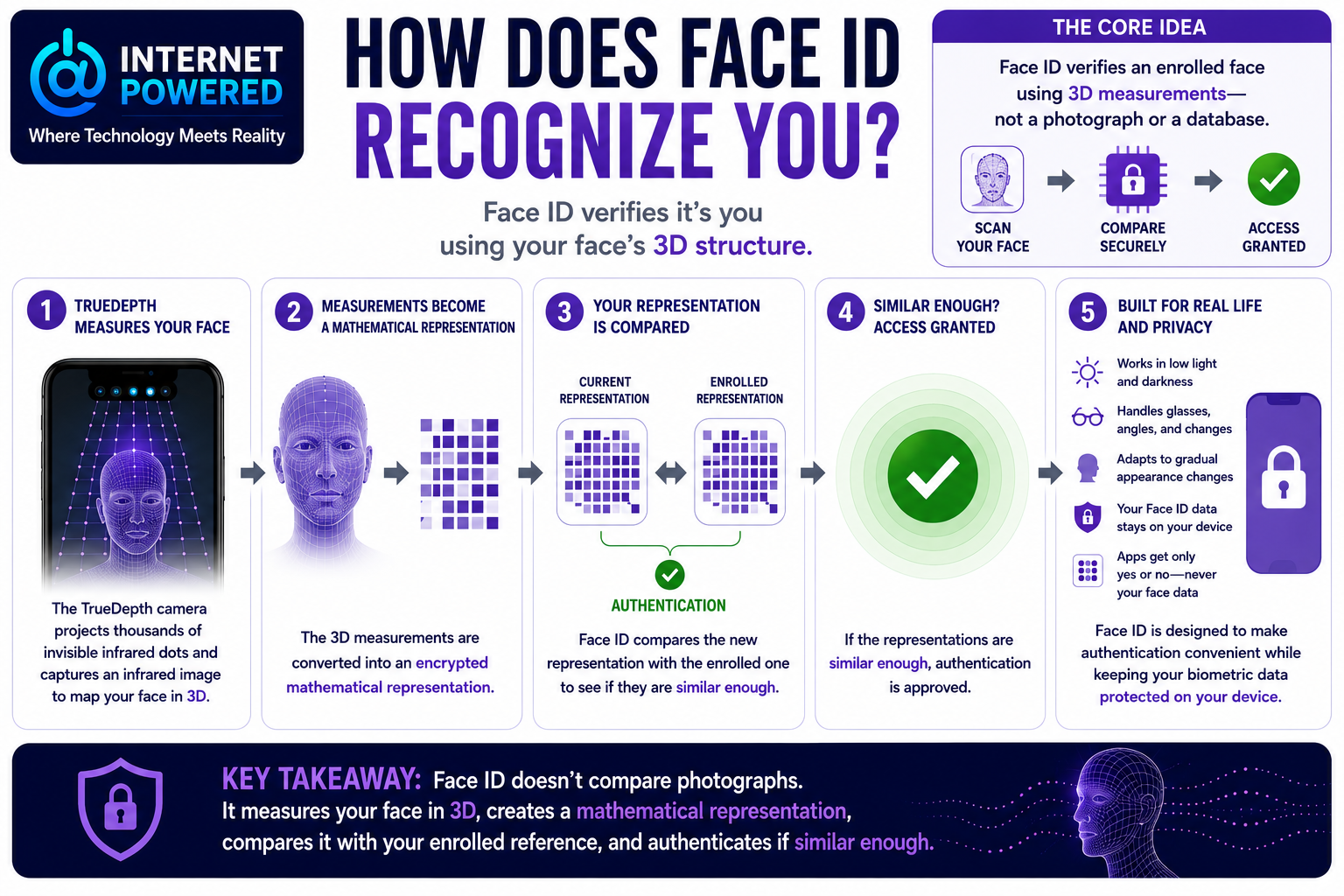
Unlike an ordinary front-facing camera, Apple’s TrueDepth camera system measures the three-dimensional structure of your face.
When Face ID activates, the system projects thousands of invisible infrared dots onto your face while capturing an infrared image. Those measurements allow the device to create a detailed depth map that describes the shape and relative position of your facial features.
This is an important distinction because the system is not relying on what your face looks like in a conventional photograph. Because Face ID relies on infrared sensing and depth measurements rather than visible light alone, it can continue working in low light and complete darkness.
Measurements Become a Mathematical Representation
Once the facial measurements have been collected, Face ID converts them into a protected mathematical representation designed for authentication.
During authentication, the system compares the newly created representation with the encrypted representation that was created during enrollment. This is why Face ID does not compare one photograph with another. Instead, it performs a machine comparison between two mathematical representations derived from facial measurements.
Authentication Allows for Everyday Changes
No person’s face appears exactly the same every time it is measured. Everyday changes such as facial expressions, head position, eyeglasses, facial hair, makeup, lighting, and gradual aging naturally produce differences between one scan and the next.
For that reason, Face ID does not require every measurement to be identical. Instead, it evaluates whether the new representation is sufficiently similar to the enrolled reference for authentication to succeed.
Apple also describes the system as gradually adapting to certain appearance changes after successful authentication or after some close matches that are confirmed with the correct passcode. This allows Face ID to remain useful over time without requiring users to repeatedly enroll their face after normal changes in appearance.
Authentication Depends on Multiple Technologies
Although Face ID appears simple to use, authentication depends on several technologies working together.
Apple uses neural networks for facial matching, attention detection, and spoof detection. During authentication, these systems help determine whether the presented face matches the enrolled representation, whether the user appears to be looking at the device when attention is required, and whether the presented face appears to be a genuine person rather than a photograph, video, mask, or another attempted spoof.
These functions work together as part of a single authentication process.
Your Facial Data Stays on Your Device
Another common misconception is that apps receive the same facial information used by Face ID.
In reality, the facial comparison takes place inside Apple’s Secure Enclave, a protected security subsystem that is isolated from the rest of the operating system. Apple states that the encrypted facial representations remain on the device, are not sent to Apple, and are not included in backups.
When an app uses Face ID, it does not receive your facial measurements or mathematical representation. It receives only the authentication result indicating whether the enrolled user successfully authenticated. This allows apps to confirm that the device owner has been verified without accessing the underlying biometric data.
Face ID Works Alongside Your Passcode
Face ID is designed to make authentication more convenient, not to replace the device passcode.
Apple requires the passcode in a number of security-sensitive situations, including after restarting the device, after multiple unsuccessful Face ID attempts, after certain security actions, and in other situations where additional verification is appropriate.
The passcode also helps Face ID adapt to gradual appearance changes by confirming certain close facial matches. Rather than competing with one another, Face ID and the passcode work together as parts of the same authentication system.
Every Biometric System Has Practical Limits
Face ID is designed to work across many everyday conditions, including low light and complete darkness, because it relies on infrared sensing rather than visible light alone. Even so, successful authentication depends on obtaining enough usable facial information. Obstructions, extreme viewing angles, damaged hardware, incomplete visibility of important facial features, or attention requirements may prevent a successful scan.
Like every biometric technology, Face ID is also probabilistic rather than absolute. Apple documents multiple defenses against presentation attacks, including depth sensing, randomized capture techniques, attention detection, and neural-network-based antispoofing. However, biometric presentation attacks remain an active area of security research, and no biometric system should be considered immune to every possible attack.
Apple also notes that the probability of a false match is higher for identical twins, similar-looking siblings, and children under 13 whose facial features may not yet be be fully developed. These examples reinforce that biometric authentication evaluates similarity rather than guaranteeing certainty.
Understanding the Process
Many people picture Face ID as comparing a live camera image with a stored photograph. The evidence supports a more accurate mental model.
Face ID measures the three-dimensional structure of your face, converts those measurements into a protected mathematical representation, compares that representation with the encrypted reference created during enrollment, and authenticates you if the new representation is sufficiently similar to the enrolled one.
That single process explains why Face ID does not rely on ordinary photographs, why it can adapt to gradual appearance changes, why apps receive only a yes-or-no authentication result, and why the system is designed to verify an enrolled user rather than identify anyone who looks at the device.
Sources
About Face ID advanced technology
Organization: Apple
Published: Current page; no original publication date displayed in the retrieved page
Apple Support
Biometric security
Organization: Apple
Published: December 19, 2024
Apple Support
Facial matching security
Organization: Apple
Published: May 7, 2024
Apple Support
Face ID, Touch ID, passcodes, and passwords
Organization: Apple
Published: December 19, 2024
Apple Support
Face ID & Privacy
Organization: Apple
Publication date: Current notice; no original publication date displayed in the retrieved page
Uses for Face ID and Touch ID
Organization: Apple
Published: December 19, 2024
Apple Support
The Secure Enclave
Organization: Apple
Published: December 19, 2024
Apple Support
Face Analysis Technology Evaluation: Presentation Attack Detection
Organization: National Institute of Standards and Technology
Publication status: Ongoing evaluation
NIST Pages
Facing the Facts to Keep Our Biometrics Secure
Organization: National Institute of Standards and Technology
Published: October 2, 2024
NIST
Face Recognition Technology Evaluation: Twins Demonstration
Organization: National Institute of Standards and Technology
Publication status: Ongoing
NIST Pages