
How Does an AirTag Know Where It Is?
An AirTag can appear on a map even when it is miles away from its owner. It might be inside luggage at an airport, attached to keys left at a restaurant, or moving through the world without its owner’s iPhone anywhere nearby.
That makes it easy to imagine an AirTag as a miniature GPS tracker. But an AirTag does not calculate its own geographic location. It does not need to.
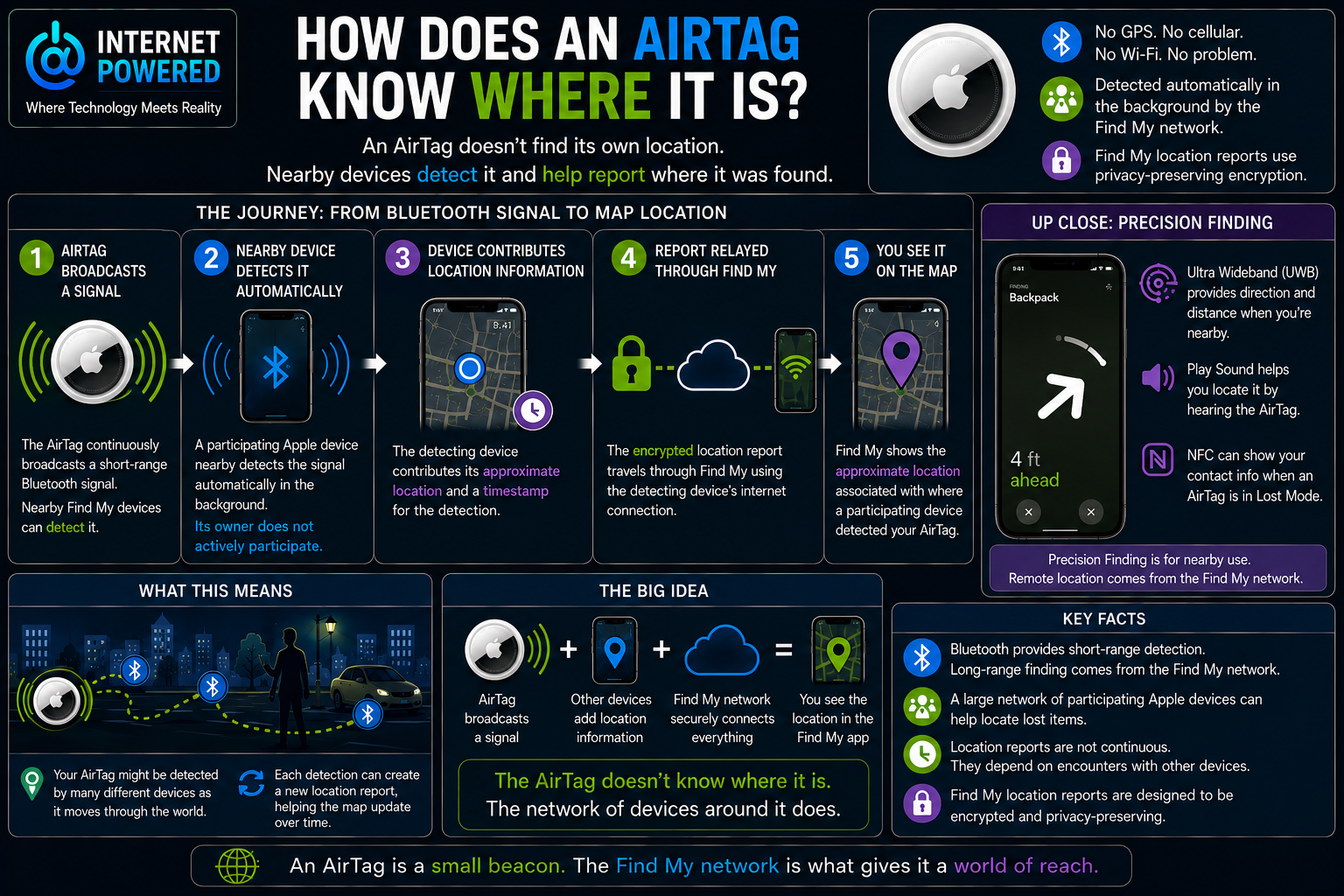
Instead, the AirTag broadcasts a short-range Bluetooth signal. Nearby participating Apple devices can detect that signal automatically, contribute their own approximate location, and relay an encrypted location report through the Find My network. The location you eventually see is therefore closer to where another device detected the AirTag than to a location calculated by the AirTag itself.
That distinction explains how such a small device can be found across surprisingly large distances without GPS or its own cellular connection.
The AirTag Starts by Announcing Its Presence
The first part of the process is relatively simple. An AirTag continuously broadcasts a secure Bluetooth signal that nearby participating Find My devices can detect.
Bluetooth works over relatively short distances, so the signal itself does not explain how an AirTag can appear in Find My when its owner is across town or even farther away. Nor does the AirTag include geographic coordinates in its broadcast.
The Bluetooth signal essentially allows the AirTag to announce that a Find My item is nearby. A useful way to think about it is as a small Bluetooth beacon rather than a miniature GPS tracker.
Bluetooth helps other devices detect the AirTag. It does not tell the AirTag where it is on a map.
A Nearby Device Supplies the Location
The geographic location comes from a different device.
When a participating iPhone, iPad, or Mac detects an AirTag over Bluetooth, that device can use its own current location information to create an encrypted report associated with the detection. The report is then relayed through Find My so that the AirTag’s owner can retrieve the resulting location.
The AirTag itself did not calculate those coordinates. The detecting device supplied the geographic information.
This also explains why the location displayed in Find My should be understood as an approximate location associated with where the AirTag was detected. The finder device is nearby, but it is not necessarily occupying exactly the same physical position as the AirTag.
The Person Carrying the Device Does Not Have to Help
One of the most important parts of the Find My network is that this process does not depend on strangers deliberately finding AirTags and reporting them.
Routine detection and location relay can happen automatically in the background. The person carrying the participating device does not need to see the AirTag, know that it is nearby, open Find My, approve the detection, decide to help, or contact the AirTag’s owner.
Their device can participate without requiring their active involvement.
That distinction helps explain how the Find My network can operate at such a large scale. The network is crowdsourced through participating devices, not through people consciously reporting every lost AirTag they encounter.
This ordinary background participation should not be confused with unwanted-tracking alerts. Those are a separate safety mechanism that may notify someone when an unknown compatible tracker appears to be moving with them over time. Apple’s public documentation supports the conclusion that routine Find My participation does not require notification, approval, or active involvement from the finder-device owner. It does not establish that the owner can never receive a notification under any circumstance.
The Network Creates the Long-Range Reach
Bluetooth remains a short-range technology. If an AirTag depended only on communicating with its owner’s phone, its usefulness would drop sharply once the two devices were separated.
The Find My network changes that relationship.
Imagine an AirTag inside luggage at a busy airport while its owner is miles away. The AirTag continues broadcasting its Bluetooth signal. A participating Apple device passes nearby and detects it automatically. That device contributes its approximate location and uses its own network connection to relay an encrypted report.
The owner’s iPhone never needed to be near the AirTag.
The process can happen again when another participating device encounters the AirTag somewhere else. Each new detection can create another opportunity for the location in Find My to be updated.
This is where the AirTag gets its effective geographic reach. The Bluetooth signal remains local, but the network of devices capable of encountering that signal can extend around the world.
The AirTag Does Not Need Its Own Internet Connection
The same architecture explains another seemingly contradictory feature of AirTag.
Apple’s published specifications do not list a cellular modem or Wi-Fi connection for the AirTag. The internet connection used to relay a remote location report belongs to the finder device.
That division of responsibilities allows an AirTag to appear remotely in Find My without independently connecting to the internet. The AirTag supplies the signal needed to be detected. The nearby device supplies the location information and connectivity needed to report the detection.
The AirTag is therefore only one part of the locating system. Much of what makes remote finding possible happens around it.
The Location Is an Estimate, Not a Live Tracking Dot
Because the reported location comes from another device, the point shown on the map should not be interpreted as a perfect measurement of the AirTag’s exact position.
The finder device may be some distance away when it detects the Bluetooth signal. Its own location estimate also has limitations. Walls, structures, Bluetooth range, movement, and the age of the report can further affect how closely the reported location corresponds to the AirTag’s current physical position.
Timing matters as well. Remote updates depend on participating devices encountering the AirTag. In a crowded airport or city, many devices may pass nearby and create frequent opportunities for new reports. In an isolated location, the AirTag may continue broadcasting normally while going much longer without being detected.
That means a Find My location may be better understood as:
The AirTag was detected around here at this time.
The timestamp is therefore an important part of interpreting a remote AirTag location.
Findability Depends on What Is Around the AirTag
This network-dependent design creates an important practical limitation.
Two AirTags can both be functioning normally while producing very different locating experiences. An AirTag in a busy airport may encounter many participating devices, creating repeated opportunities for updated location reports. The same AirTag on an isolated trail may encounter no participating devices for a long period.
Nothing necessarily changed about the AirTag itself. What changed was the network around it.
Remote findability therefore depends partly on whether participating Find My devices come close enough to detect the AirTag. The network gives AirTag its remarkable reach, but that reach depends on encounters rather than a continuous long-distance connection from the AirTag itself.
Precision Finding Takes Over When You Get Close
Remote Find My locating answers one question: what general area was the AirTag detected in?
Once the owner reaches that area, a different technology can help answer a more immediate question: exactly where is it?
AirTags and compatible Apple devices use Ultra Wideband for Precision Finding. When the owner is nearby, Precision Finding can provide distance, direction, visual guidance, haptic feedback, and audio guidance.
Bluetooth and the AirTag’s built-in speaker can also help during nearby searching. The speaker can play a sound when commanded by the owner, making the physical item easier to locate once the search has narrowed to a small area.
These technologies solve different parts of the same problem. The Find My network helps bring the owner into the general area. Nearby technologies help finish the search.
Ultra Wideband is not what allows an AirTag to appear on a map from across town or across the country. That long-distance capability comes from the Find My network.
NFC Provides Another Way to Recover a Lost AirTag
AirTag also includes NFC, but it serves a different purpose.
NFC does not provide the normal remote map location. If an AirTag is placed in Lost Mode, someone who physically finds it can tap it with an NFC-capable smartphone and access information the owner has chosen to make available for recovery.
This gives AirTag another recovery path, but it should not be confused with the automatic Bluetooth detection that powers remote Find My location reports.
The AirTag Is Not Building a Location History
Another useful distinction concerns what the AirTag itself stores.
Apple says AirTag does not physically store its location data or location history. It is therefore not traveling around recording a geographic log and later uploading that history.
The useful location information comes from Find My reports created when participating devices detect the AirTag.
Once again, the same mental model applies: the AirTag supplies the signal, while the surrounding system supplies the geographic location.
Understanding What the Map Really Means
An AirTag appears to accomplish something that would normally seem to require GPS, cellular connectivity, and its own internet connection. The reason it can work without performing all of those jobs itself is that the locating process is distributed across multiple devices.
The AirTag broadcasts its presence over Bluetooth. Nearby participating Apple devices can detect that signal automatically in the background. Those devices contribute their approximate location and use their own network connection to relay encrypted reports through Find My. The AirTag owner then sees the resulting approximate location.
When the owner reaches the general area, Ultra Wideband, Bluetooth, and sound can help complete the search.
The central idea is straightforward: the AirTag does not know where it is. The network of devices around it does.
Sources
AirTag
Organization: Apple
Status verified: August 2026
https://www.apple.com/airtag/
Find My Security
Organization: Apple
https://support.apple.com/guide/security/find-my-security-sec6cbc80fd0/web
Locating Missing Devices
Organization: Apple
https://support.apple.com/guide/security/locating-missing-devices-sece994d0126/web
Introducing AirTag
Organization: Apple
Published: April 20, 2021
https://www.apple.com/newsroom/2021/04/apple-introduces-airtag/
Use Find My to Locate Your Lost Apple Device or AirTag
Organization: Apple
https://support.apple.com/en-us/104978
Locate an AirTag or Other Item in Find My
Organization: Apple
https://support.apple.com/guide/iphone/locate-an-item-ipha779f0c10/ios
New AirTag with Expanded Range and Improved Findability
Organization: Apple
Published: January 26, 2026
https://www.apple.com/newsroom/2026/01/apple-introduces-new-airtag-with-expanded-range-and-improved-findability/
Unwanted Tracking Alerts
Organizations: Apple and Google
Published: May 13, 2024
https://www.apple.com/newsroom/2024/05/apple-and-google-deliver-support-for-unwanted-tracking-alerts-in-ios-and-android/