
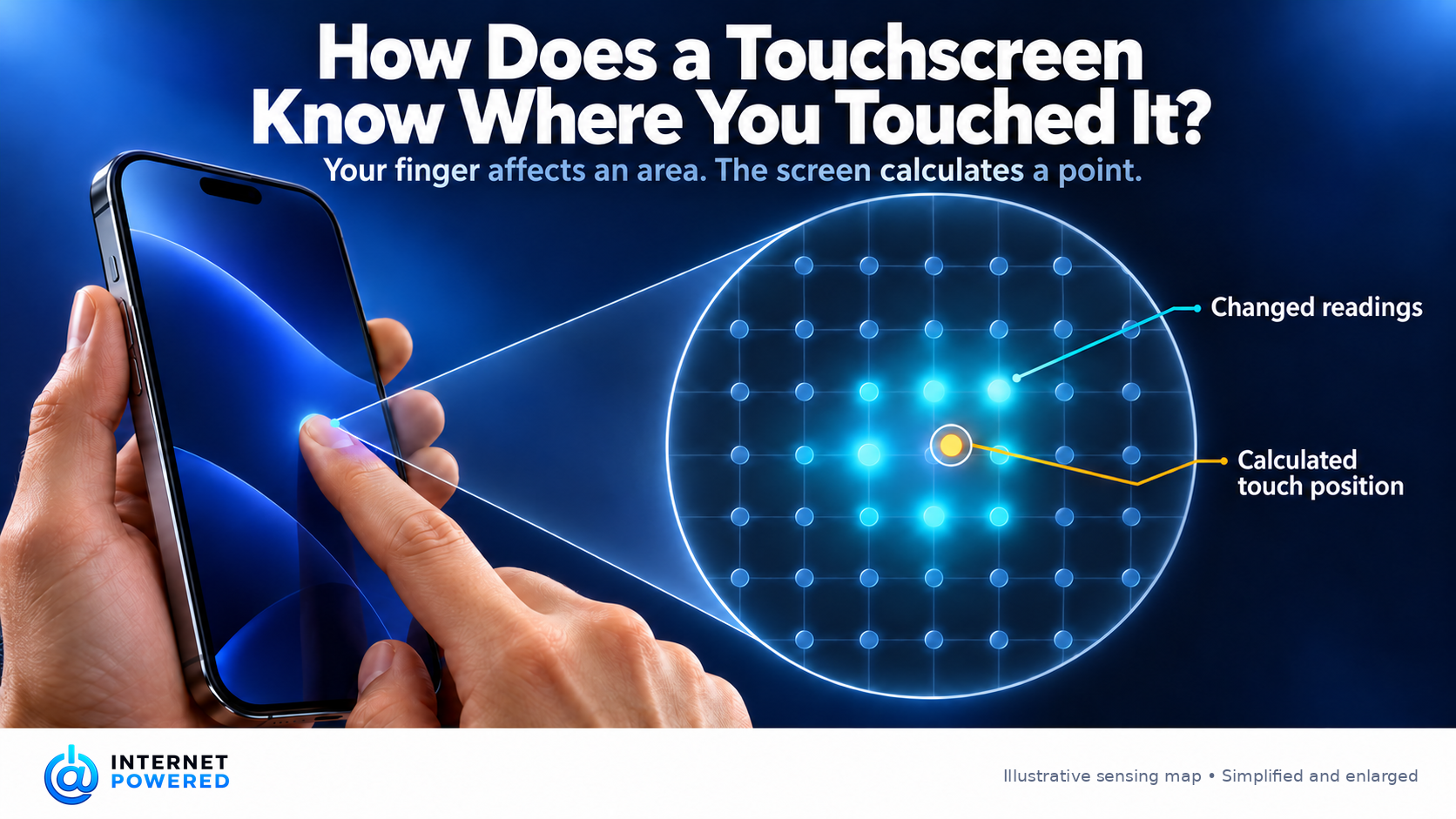
You tap a small button on a glass screen, and it responds as if it knew the exact spot where your finger landed. The glass has no visible buttons at that location. So what measured the touch?
On a common phone touchscreen, a nearly transparent pattern of conductive electrodes sits beneath the cover glass, in front of or integrated with the display. The phone continually measures electrical relationships across this pattern. Your finger changes those measurements in a small area. A touch controller turns that pattern of changes into a position on the screen. [1][2]
A hidden map under the glass
Imagine two sets of sensing paths crossing the screen, one running broadly in one direction and the other across it. Their crossings create a map of measurement points. The real electrodes may have diamond-shaped or other patterns rather than simple straight lines, but the idea is the same: each combination of paths corresponds to a particular region. Transparent conductors let the display remain visible beneath them. [1][2]
The controller sends a changing electrical signal along one set of electrodes and reads its effect on the other set. Even though the electrodes do not touch each other, an electric field links them. The ease with which a signal couples from one to the other is called mutual capacitance. With no finger nearby, the controller has a normal reading for each region. [1][2]
When your finger approaches the glass, its conductive tissue interacts with the field above the electrodes. At nearby crossings, less of the field couples in the usual way between the transmitting and receiving paths. The change is small, but measurable. The finger does not need to press through the glass or complete a metal-to-metal circuit; it affects the field through the insulating cover. [1][2]
This is why “the screen senses your electricity” is an imperfect shortcut. The screen supplies and measures the electrical signals. Your finger changes how those signals behave nearby. In a common mutual-capacitance design, the measured coupling between two electrodes falls. Other capacitive arrangements can measure a different kind of change, so a description that simply says “capacitance increases” does not explain every touchscreen. [1][2]
From a change to a coordinate
The touch controller scans the sensing pattern and compares its readings with the untapped state. A finger usually affects several neighboring regions, with stronger and weaker changes depending on where its contact area lies. The controller looks for a coherent touch signal, filters out small fluctuations, and estimates the center of that cluster. It reports an X and Y coordinate to the device. [1]
That estimate is more precise than merely selecting the nearest crossing. If the strongest changes sit between two neighboring regions, their relative sizes help place the touch between them. Infineon describes a controller algorithm that uses a three-by-three neighborhood of readings to calculate each coordinate. Its particular formula is one implementation, but the general point is that the screen infers position from a pattern rather than waiting for a fingertip to land on a particular “square.” [1]
If two fingers touch in separate places, they produce separate local patterns. A controller that measures the row-and-column intersections individually can locate both at once. This is one reason mutual-capacitance sensing suits gestures such as pinching an image. A design that reads only entire rows and columns can struggle to pair multiple rows with the right columns, creating ambiguous locations. [1][2]
Once the controller has a coordinate, the phone can compare it with what the software has drawn there. The sensing layer determines where the contact is; the app decides whether that coordinate falls on a button, a link, a keyboard key, or empty space. The same sensing surface can therefore serve every screen of the app without moving any physical buttons.
Why some touches fail
The measurement depends on a detectable change in the electric field, not simply on something pressing the glass. An ordinary thick glove may put too much material between the finger and the electrodes, making the signal weak. Whether it works depends on the glove, the screen, and the controller’s sensitivity; touchscreens can be designed and tuned to work with gloves. Thicker cover glass can also weaken the signal. [3]
Water can cause problems in another way: it may alter the electrical measurements across the surface and produce confusing or false signals. Designers use sensing and filtering strategies to handle moisture, but performance depends on the particular design. [1]
And this explanation is about the capacitive technology commonly used for phone screens, not a universal rule for every device called a touchscreen. In a resistive touchscreen, pressure brings two conductive layers into contact. Its controller measures electrical values along the two axes to find the position, so a pen or other object can operate it by pressing. [4]
The small moment between your finger landing and a button responding is therefore a chain of inferences: a field changes, a cluster appears in an invisible map, the controller calculates its center, and the software checks what was drawn at that coordinate. The glass does not know what you meant to press. It gives the phone enough information to make a good estimate of where you touched. [1][2]
Source Library
[1] PSOC™ 4 CAPSENSE™ Touchpad Design Guide. Infineon Technologies, November 25, 2025.
[2] CapTIvate™ Technology Guide: Capacitive Sensing Basics. Texas Instruments, © 2015.