
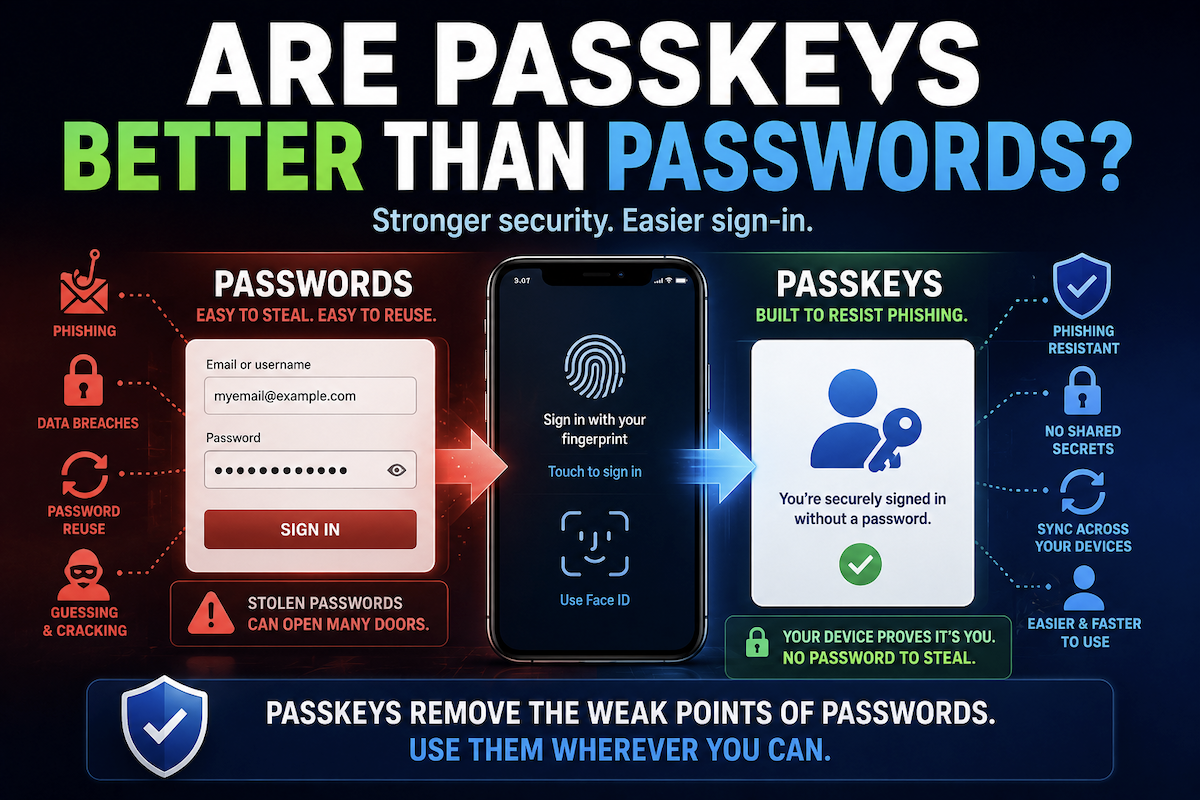
Are passkeys better than passwords?
Passkeys are better than passwords for most people and most personal accounts, but not because they make accounts impossible to compromise.
They are better because they remove some of the weakest parts of password-based login.
A password is something a person knows and types. That creates several familiar problems. People can reuse it, choose one that is easy to guess, type it into a fake website, or have it exposed when a company suffers a data breach.
Passkeys work differently.
Instead of asking you to remember and type a secret, a passkey lets your device or credential manager prove to the website or app that you are allowed to sign in. You usually approve that process by unlocking your device with a fingerprint, face check, PIN, or passcode.
That may feel like a small change.
It is not.
Passkeys are much harder to phish
The strongest argument for passkeys is phishing resistance.
A typical phishing attack tries to trick someone into entering a password on a fake website. If the person types the password, the attacker can try to use it on the real site.
Passkeys are designed to avoid that problem.
There is no password for the user to type, copy, paste, or accidentally give away. The passkey is connected to the real website or app through cryptographic checks. A fake site cannot use a passkey the same way it can use a stolen password.
That does not mean passkeys stop every scam.
They protect the sign-in step. They do not stop someone from being tricked after signing in.
A scammer might still persuade someone to send money, approve a transaction, download malware, change account settings, or share sensitive information. Passkeys do not prevent every bad decision or every form of social engineering.
They make one very important attack much harder: stealing login credentials.
Passkeys reduce the damage from password reuse
Passwords are shared secrets.
The user knows the password, and the service stores information related to it. If attackers steal a password database, they may try to crack weak passwords or reuse exposed passwords on other websites.
That is one reason password reuse is so dangerous.
A stolen password from one site can become a key to another account.
Passkeys are different because they use public-key cryptography. The website receives a public key. The private key stays protected by the user’s device or authenticator.
The practical result is that a website breach does not expose a reusable password that attackers can type into other services.
Attackers may still steal other account data from a breached company. Passkeys do not erase the damage of a data breach.
But they reduce one of the most common consequences: exposed credentials that can be reused elsewhere.
Passkeys can be easier to use
Security only helps if people can use it consistently.
That is another reason passkeys matter.
For many people, using a passkey feels like unlocking a phone or laptop. Instead of remembering a long password, typing it correctly, and entering a separate code, the person approves the sign-in through a trusted device or credential manager.
The fingerprint, face check, PIN, or passcode is not the passkey itself. It is the local method the device uses to confirm that the person is allowed to use the passkey.
That distinction matters.
The passkey is the credential. The device unlock is the permission step.
This can make strong authentication feel less like a burden and more like a normal part of using a device.
Passkeys are not magic
Passkeys improve authentication.
They do not make accounts invincible.
A passkey still depends on the security of the device, browser, operating system, credential manager, and recovery process. If someone compromises the account that syncs passkeys across devices, steals an unlocked device, or abuses a weak recovery process, risk remains.
This is especially important because many people will use synced passkeys.
Synced passkeys are convenient because they can be available across multiple devices. But that convenience means the account or credential manager responsible for syncing becomes very important.
A single-device passkey or hardware security key may reduce some sync-account risk, but it creates a different problem: losing the device or key can make account recovery harder.
There is no version of login security that removes every tradeoff.
Passkeys shift the risk away from memorized secrets and phishing. They do not eliminate the need to protect devices and recovery methods.
Recovery can become the weak point
A strong sign-in method is only as practical as the recovery process behind it.
If someone loses access to a phone, laptop, or credential manager, they need a safe way to get back into important accounts.
That recovery path can become the weak point.
Some accounts may still rely on email reset links, SMS codes, support-desk recovery, backup codes, or older login methods. If those methods are weaker than the passkey, attackers may try to bypass the passkey by attacking recovery instead.
This is why passkeys should not be evaluated only by the sign-in screen.
The better question is:
What happens if the device is lost, stolen, replaced, or unavailable?
A secure login method can still fail users if recovery is confusing, fragile, or easy to abuse.
Passwords are not gone yet
The realistic conclusion is not that passwords are dead.
Many websites and apps still require passwords. Some support passkeys only as an option. Others keep passwords as a fallback even after a passkey is added.
That means most people will live in a mixed world for a while.
The best practical approach is to use passkeys where they are available, especially for important accounts such as email, banking, cloud storage, shopping, and social media.
For accounts that do not support passkeys, strong password habits still matter.
Use a password manager. Create long, unique passwords. Turn on two-step verification where available. Avoid reusing passwords across accounts.
Passkeys reduce dependence on passwords. They do not instantly remove passwords from the internet.
What the evidence supports
The evidence supports a clear conclusion:
For most people and most personal accounts, passkeys are generally better than passwords.
They are stronger against phishing. They cannot be reused across sites. They reduce the damage caused by stolen password databases. They can also be easier for people to use consistently.
But passkeys do not solve every account-security problem.
They do not protect a compromised device. They do not stop scams after login. They do not guarantee safe account recovery. They do not help on services that do not support them. They do not remove the need for strong passwords where passwords remain required.